Raspberry Zero : Configuration VNC.
Distribution de travail : Raspberry Pi OS 2020-12-02
1/ A partir d’un ordinateur, Insérer l’adaptateur ‘carte SD‘ pour micro-SD.
2/ Graver l’image.
3/ Enlever et réinsérer l’adaptateur ‘carte SD‘.
La carte SD est monté dans les répertoires de montage :
/media/util01/boot/
/media/util01/rootfs/
4/ Configuration de ssh.
Créer :
/media/util01/boot/sshAjouter :
Rien5/ Configuration réseau sans-fil.
Créer :
/media/util01/boot/wpa_supplicant.confAjouter :
country=FR
ctrl_interface=DIR=/var/run/wpa_supplicant GROUP=netdev
update_config=1
network={
 ssid="ressf01"
 scan_ssid=1
 psk="Mot2Passe"
 key_mgmt=WPA-PSK
}
6/ Configuration du ‘hostname‘.
Ouvrir :
/media/util01/rootfs/etc/hostnameRemplacer tout par :
raspberryzero.local7/ Démonter les répertoires et enlever l’adaptateur ‘carte SD‘.
8/ Insérer la carte micro-SD dans le Raspberry Zero.
9/ Test de la connexion à partir d’un autre ordinateur du réseau.
util01@station66:~$ ping raspberryzero.local -c 2
PING raspberryzero.local (192.168.1.35) 56(84) bytes of data.
64 bytes from pc672.home (192.168.1.35): icmp_seq=1 ttl=64 time=102 ms
64 bytes from pc672.home (192.168.1.35): icmp_seq=2 ttl=64 time=9.07 ms
--- raspberryzero.local ping statistics ---
2 packets transmitted, 2 received, 0% packet loss, time 1001ms
rtt min/avg/max/mdev = 9.073/56.035/102.997/46.962 ms
10/ Test de la connexion ssh.
util01@station66:~$ ssh pi@raspberryzero.local
Warning: the ECDSA host key for 'raspberryzero.local' differs from the key for the IP address '192.168.1.35'
Offending key for IP in /home/util01/.ssh/known_hosts:44
Matching host key in /home/util01/.ssh/known_hosts:75
Are you sure you want to continue connecting (yes/no)? yes
pi@raspberryzero.local's password:
Linux raspberryzero.local 5.4.79+ #1373 Mon Nov 23 13:18:15 GMT 2020 armv6l
The programs included with the Debian GNU/Linux system are free software;
the exact distribution terms for each program are described in the
individual files in /usr/share/doc/*/copyright.
Debian GNU/Linux comes with ABSOLUTELY NO WARRANTY, to the extent
permitted by applicable law.
Last login: Wed Dec  2 13:05:17 2020
SSH is enabled and the default password for the 'pi' user has not been changed.
This is a security risk - please login as the 'pi' user and type 'passwd' to set a new password.
pi@raspberryzero:~ $
11/ Configuration du Raspberry Zero.
pi@raspberryzero:~ $ sudo raspi-config- Activation du serveur VNC :
- 3 Interface Options Configure connections to peripherals
- P3 VNC Enable/disable graphical remote access using RealVNC12/ Sur un autre ordinateur, installation de vncviewer de RealVNC.
- Téléchargement : https://www.realvnc.com/fr/connect/download/viewer/linux/
- Installation :
util01@station66:~$ cd Téléchargements/
util01@station66:~/Téléchargements$ sudo dpkg -i VNC-Viewer-6.20.529-Linux-x64.deb- Visualisation :
util01@station66:~$ vncviewer 192.168.1.35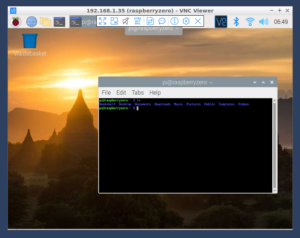
13/ Changement de résolution.
pi@raspberryzero:~ $ sudo raspi-config
    - 2 Display Options      Configure display settings
        - D1 Resolution      Set a specific screen resolution
            - DMT Mode 9  800x600 60Hz 4:3