[PI3] Installation de Quake 2
1/ Système d'exploitation.
Distribution : Raspbian Jessie with desktop Image : 2017-07-05-raspbian-jessie.zip Adresse de téléchargement : http://vx2-downloads.raspberrypi.org/raspbian/images/raspbian-2017-07-05/2017-07-05-raspbian-jessie.zip
2/ Modification des dépôts.
Ouvrir :
/etc/apt/sources.listChercher :
deb http://mirrordirector.raspbian.org/raspbian/ jessie main contrib non-free rpiRemplacer par :
deb http://mirror.ox.ac.uk/sites/archive.raspbian.org/archive/raspbian jessie main contrib non-free rpi3/ Mise-à-jour de la distribution.
pi@localhost:~ $ sudo apt-get update
pi@localhost:~ $ sudo apt-get upgrade
4/ Installation des paquets de base.
pi@localhost:~ $ sudo apt-get install vim mc screen links5/ Installation des paquets de développement.
pi@localhost:~/JEUX/QUAKE2 $ sudo apt-get install build-essential libgl1-mesa-dev libsdl2-dev libogg-dev libvorbis-dev libopenal-dev zlib1g-dev
pi@localhost:~/JEUX/QUAKE2 $ sudo apt-get install libsdl1.2-dev git
6/ Activation de pilote GL.
pi@localhost:~ $ sudo raspi-config- [7 Advanced Options]
- [A6 GL Driver]
- [G1 GL (Full KMS) OpenGL desktop driver with full KMS]
- [<ok>]
- [<ok>]
- [7 Advanced Options]
- [A3 Memory Split]
- 128
- [<ok>]
- [<finish>]
- [<oui>]7/ Répertoire de travail.
pi@localhost:~ $ mkdir -p JEUX/QUAKE2
pi@localhost:~ $ cd JEUX/QUAKE2/
pi@localhost:~/JEUX/QUAKE2 $
8/ Téléchargement de Yamagi Quake 2 Opengl-es : commit 9f638c7 on 26 May 2012
pi@localhost:~/JEUX/QUAKE2 $ wget https://github.com/yquake2/yquake2/archive/opengl_es.zip
pi@localhost:~/JEUX/QUAKE2 $ unzip opengl_es.zip
pi@localhost:~/JEUX/QUAKE2 $ cd yquake2-opengl_es/
pi@localhost:~/JEUX/QUAKE2/yquake2-opengl_es $
9/ Configuration du Makefile.
Ouvrir :
MakefileChercher :
# Refuse all other platforms as a firewall against PEBKAC
# (You'll need some #ifdef for your unsupported  plattform!)
ifeq ($(findstring $(ARCH), i386 x86_64 sparc64),)
$(error arch $(ARCH) is currently not supported)
endif
Remplacer par :
# Refuse all other platforms as a firewall against PEBKAC
# (You'll need some #ifdef for your unsupported  plattform!)
ifeq ($(findstring $(ARCH), i386 x86_64 sparc64 armv7l),)
$(error arch $(ARCH) is currently not supported)
endif
10/ Compilation.
pi@localhost:~/JEUX/QUAKE2/yquake2-opengl_es $ make
===> Building quake2
make release/quake2
make[1]: Entering directory '/home/pi/JEUX/QUAKE2/yquake2-opengl_es'
===> CC src/client/cl_cin.c
...
===> CC src/game/savegame/savegame.c
===> LD release/baseq2/game.so
make[1]: Leaving directory '/home/pi/JEUX/QUAKE2/yquake2-opengl_es'
pi@localhost:~/JEUX/QUAKE2/yquake2-opengl_es $
11/ Installation de Quake 2 Démo.
- Répertoire de travail :
pi@localhost:~/JEUX/QUAKE2/yquake2-opengl_es $ cd ..
pi@localhost:~/JEUX/QUAKE2 $ mkdir demo
pi@localhost:~/JEUX/QUAKE2 $ cd demo/- Téléchargement de la démo :
pi@localhost:~/JEUX/QUAKE2/demo $ wget https://ayera.dl.sourceforge.net/project/dcquake/quake2/demo/q2-314-demo-x86.exe- Décompression de l'archive :
pi@localhost:~/JEUX/QUAKE2/demo $ unzip q2-314-demo-x86.exe- Copie des fichiers .pak :
pi@localhost:~/JEUX/QUAKE2/demo $ cp Install/Data/baseq2/ ../yquake2-opengl_es/release/ -r
pi@localhost:~/JEUX/QUAKE2/demo $ cd ../yquake2-opengl_es/
pi@localhost:~/JEUX/QUAKE2/yquake2-opengl_es $ cd release/
pi@localhost:~/JEUX/QUAKE2/yquake2-opengl_es/release $
12/ Configuration de Quake 2.
Ouvrir :
/home/pi/JEUX/QUAKE2/yquake2-opengl_es/release/yq2.cfgAjouter :
set s_initsound 0
set r_shadows 0
set gl_shadows 0
set gl_dynamic 0
13/ Lancement de Quake 2.
pi@localhost:~/JEUX/QUAKE2/yquake2-opengl_es/release $ ./quake214/ Capture d'écran.
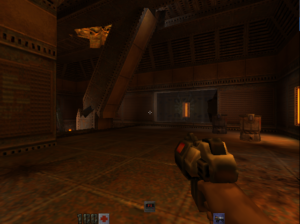
15/ Liens.
https://www.raspberrypi.org/forums/viewtopic.php?f=78&t=180667#p1194521 https://miniordi.hacktech.dev/quake-2/