Installation d'une horloge matériel.
Matériel : Module horloge en temps réel Raspberry Pi
1/ Insertion de l'horloge dans le 'Pin 1'.
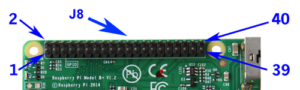 Soit :
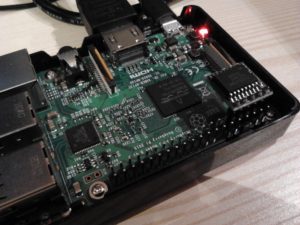
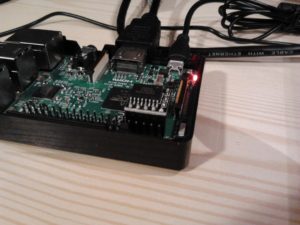 Lien : http://pi4j.com/pins/model-3b-rev1.html
2/ Initialisation des modules de temps.
Ouvrir :
/boot/config.txtAjouter à la fin :
dtoverlay=i2c-rtc,ds32313/ Suppression de l'application de fausse horloge.
pi@minetest:~ $ sudo apt-get purge fake-hwclock4/ Redémarrage.
pi@minetest:~ $ sudo reboot5/ Ecriture du temps réel dans l'horloge.
pi@minetest:~ $ sudo hwclock -w --debug
hwclock from util-linux 2.29.2
Using the /dev interface to the clock.
Assuming hardware clock is kept in UTC time.
Waiting for clock tick...
/dev/rtc does not have interrupt functions. Waiting in loop for time from /dev/rtc to change
...got clock tick
Time read from Hardware Clock: 2000/01/01 00:00:45
Hw clock time : 2000/01/01 00:00:45 = 946684845 seconds since 1969
Time since last adjustment is 946684845 seconds
Calculated Hardware Clock drift is 0.000000 seconds
missed it - 1505161116.788261 is too far past 1505161116.500000 (0.288261 > 0.001000)
1505161117.500000 is close enough to 1505161117.500000 (0.000000 < 0.002000)
Set RTC to 1505161117 (1505161116 + 1; refsystime = 1505161116.000000)
Setting Hardware Clock to 20:18:37 = 1505161117 seconds since 1969
ioctl(RTC_SET_TIME) was successful.
Not adjusting drift factor because the --update-drift option was not used.
6/ Vérification.
pi@minetest:~ $ dmesg | grep rtc
[    3.798097] rtc-ds1307 1-0068: SET TIME!
[    3.804731] rtc-ds1307 1-0068: rtc core: registered ds3231 as rtc0
7/ Configuration de la timezone.
pi@minetest:~ $ sudo dpkg-reconfigure tzdata8/ Paramétrage de l'heure à partir de l'horloge.
Ouvrir :
/etc/rc.localChercher :
exit 0Ajouter avant :
/sbin/hwclock -s9/ Post-configuration.
Ouvrir :
/etc/default/hwclockChercher :
#HWCLOCKACCESS=yesRemplacer par :
HWCLOCKACCESS=no10/ Suppression du protocole de temps.
pi@minetest:~ $ sudo apt-get purge ntp
pi@minetest:~ $ sudo apt-get install ntpdate
11/ Redémarrage.
pi@minetest:~ $ sudo reboot12/ Vérification de la présence de l'horloge.
pi@minetest:~ $ cat /proc/driver/rtc
rtc_time    : 20:27:07
rtc_date    : 2017-09-11
alrm_time   : 00:00:00
alrm_date   : 1970-01-01
alarm_IRQ   : no
alrm_pending    : no
update IRQ enabled  : no
periodic IRQ enabled    : no
periodic IRQ frequency  : 1
max user IRQ frequency  : 64
24hr        : yes
pi@minetest:~ $ dmesg | grep rtc
[ 3.835026] rtc-ds1307 1-0068: rtc core: registered ds3231 as rtc013/ Test.
pi@minetest:~ $ date
lundi 11 septembre 2017, 22:28:19 (UTC+0200)
14/ Débrancher le câble réseau, arrêter le Raspeberry Pi 3 pendant quelques minutes puis le rallumer.15/ Test.
pi@minetest:~ $ date
lundi 11 septembre 2017, 22:48:19 (UTC+0200)
16/ Script : Réglage manuel de l'horloge système et matériel.
Ouvrir :
dAjouter :
#!/bin/sh
read -p 'Date (MM/DD/AAAA): ' datevar
read -p 'Time (HH:MM:00): ' timevar
echo
echo Date: $datevar Time: $timevar
sudo date -s $datevar
sudo date -s $timevar
sudo hwclock -w -D
date
17/ Lien.
https://trick77.com/adding-ds3231-real-time-clock-raspberry-pi-3/